 Flex Music Labs
Standalone piano and VST®3 plugin
PianoFlex
A complete, ready-to-play piano. Its sound is modeled, computed note by note as you play, and every part of it is yours to shape: the hammers, the strings, the soundboard, the microphones and the room.

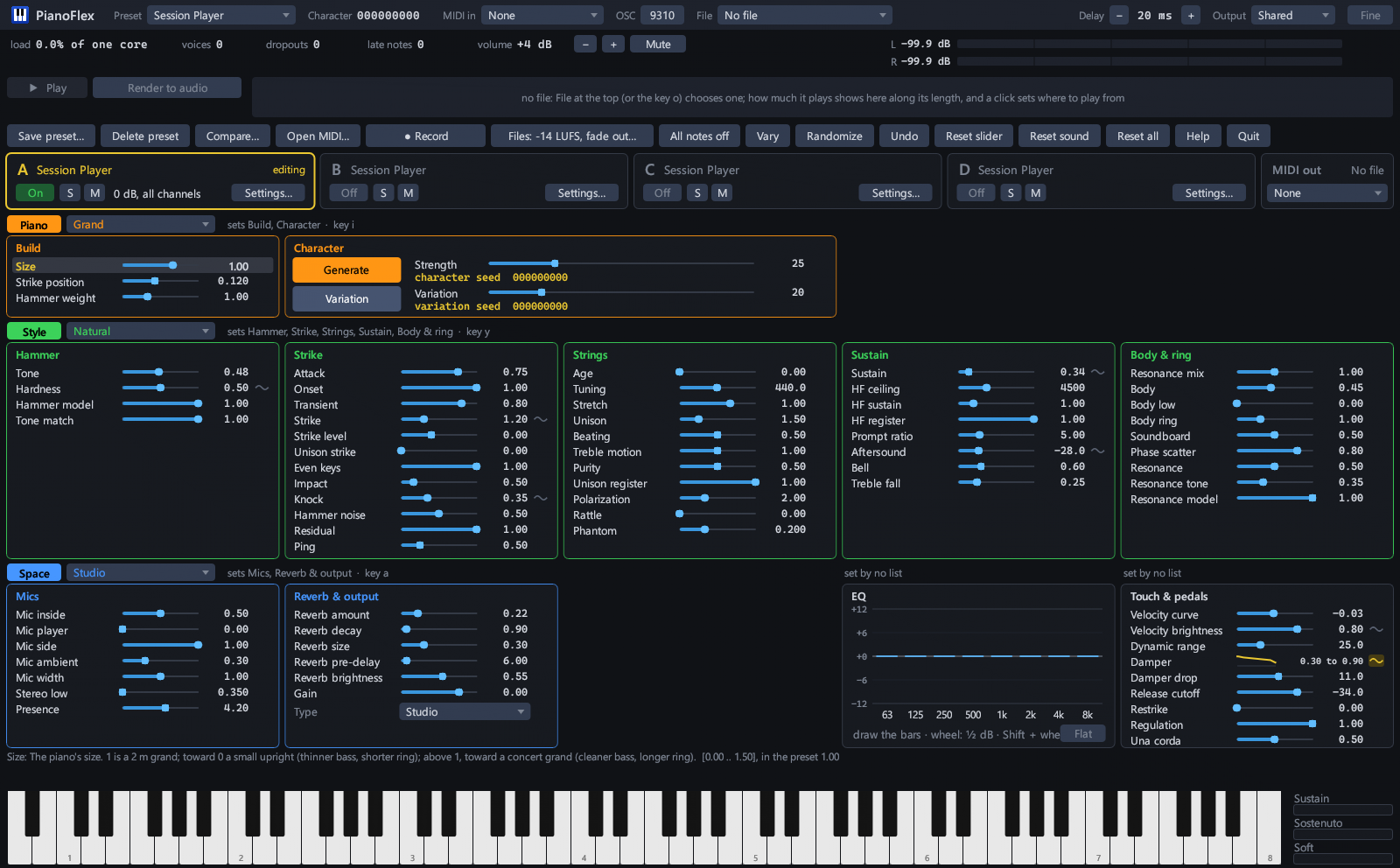
The controls
Every part of the piano, yours to shape.
About 70 sliders and an eight-band EQ, in 11 panels, take you from the size of the piano to the felt on its hammers and the room around it. Some sliders can be drawn as a curve from the lowest keys to the highest, so the bass can have softer felt than the treble. Move a slider while you play and, a moment later, the notes you play next have the change, with no click. Notes already sounding keep their sound for a moment, then fade out.
Build
The size of the piano, from a small upright to a concert grand, where the hammers strike the strings, and how heavy the hammers are.
Hammer
The felt, from soft and warm to hard and bright, and the overall tone.
Drawn along the keyboard: Hardness
Strike
How each note begins: the attack, the knock and contact noise of the hammer, the thump of the soundboard, and the ping of the highest overtones.
Drawn along the keyboard: Knock, Strike
Strings
How the piano is tuned: concert pitch, the stretched tuning of a real piano, how far apart each note's strings are tuned (the slow beating in a piano's tone), string rattle, and Age, for keys drifting out of tune.
Sustain
How long notes ring and how they fade: the quick early drop, the long ring after it, how long the high overtones last, and a bell-like ring.
Drawn along the keyboard: Sustain, Aftersound
Body & ring
The soundboard and the body of the piano, and the other strings ringing along in sympathy, more with the sustain pedal down.
Mics
Where you listen from: inside the piano over the strings, at the player's head, at the side or across the room, or a mix of them, and how wide the stereo image is.
Reverb & output
The room around the piano: a Type list of 28 rooms and plates, then how much reverb, how long and how large, how soon it starts and how bright it is. Also the output level.
EQ
Eight bands, from deep bass to the air at the top, each up to 12 dB louder or softer.
Touch & pedals
How the piano answers your hands: how hard you must play for a loud note, the range from softest to loudest, how much brighter loud notes sound, how firmly the dampers stop the strings, and how a note sounds when you strike it again.
Drawn along the keyboard: Damper, Velocity brightness
Starting points
Three lists set whole panels at once. Piano chooses the build (5, from Grand to Small Upright), Style the tone (12, from Natural to Honky-tonk), and Space the room (12, from Dry to Cavern). Any piano goes with any style in any space.
Something new
Vary moves the sliders a little, for a slightly different piano. Randomize moves them further from the preset, for a quite different one. Undo goes back up to 50 steps, and Reset returns a slider, the sound or everything to the preset.
Character
A new character at the press of a button.
Press Generate and the piano you're playing takes on a new character: its own color, ring and personality from key to key. Your sliders stay where you set them. Press Variation for a close relative of the character you have; the Variation slider sets how close. Notes already sounding keep their sound for a moment, then fade out, and the notes you play next have the new character. Undo brings back the last one.
- Character strength
- 0The plain piano.
- 25Subtle: a slightly different piano. The default.
- 50Clearly another piano. Still a real-sounding piano for many characters, past one for some.
- 75Beyond a real piano, for most characters.
- 100As far as the character goes, often wild.
The character decides what changes: color, ring, bloom, how each note's overtones start and move, how alike or uneven the keys are. Strength decides how much.
Also in PianoFlex
Ready for playing, recording and your DAW.
33 presets built in
Session Player and 32 more, in seven families: Concert & Classical; Intimate; Uprights & Vintage; Pop & Band; Jazz, Soul & Gospel; Film & Ambient; and Experimental. Save your own the same way: a preset keeps the whole sound and brings it back exactly.
Four slots
Keep four sounds at hand in slots A to D and switch between them, or turn two or more on to layer them, each with its own level, octave and MIDI channels. Compare… sets your sound beside any preset, and Tab switches between the two.
Standalone or plugin
Play it as a program of its own, or load it as a VST3 plugin in any DAW that hosts them. The plugin has the same sound controls, every slider and preset. Opening MIDI files, rendering, recording and MIDI out are in the standalone program, since your DAW does those.
Play MIDI files
Open a MIDI file and play it on any preset. A strip along the window shows how much is playing over the whole piece, and the keys light up as they play. Click the strip to choose where it plays from. Or send the file's notes through MIDI out to another instrument or program.
Record and render
Record what you play, as audio and as MIDI, or render a MIDI file to audio faster than real time, at a level ready to use.
Small and self-contained
The program is about 12 MB. It plays no recordings, so there are no samples to load or stream, and nothing more is downloaded.
Details
| Runs on | Windows 11, 64-bit |
|---|---|
| Formats | Standalone program and VST3 plugin, sharing one license |
| Plays from | A MIDI keyboard or other MIDI input; ComposerFlex, straight into the standalone program on the same PC; MIDI files, opened in the program; and in a DAW, the track's MIDI |
| Records | Audio and MIDI of what you play, and renders of MIDI files |
| Size | About 12 MB |
| Voiced from | Measurements of freely licensed recordings of real pianos, across the whole keyboard (see the credits) |
| Help | The user guide, also installed with it: Help, then User guide opens it in your browser. |
| Internet | Never connects: no update checks, crash reports or tracking |
| Try it first | The demo is the same download as the full program, so you can check how it runs on your PC before you buy |